Introducing LinkedIn Proxy: sourcing before you connect anything
· 5 min read · Michal Juhas
The most common question from new Calyflow users isn’t “how do the agents work?” It’s “why is my shortlist empty?”
The answer, until now, was almost always the same: the sourcing agent had nothing to search. AI sourcing is only as good as the data sources behind it, and connecting your first people-search tool means picking a vendor, opening an account, finding the API key, pasting it into Settings. For a technical founder that’s ten minutes. For a busy recruiter it’s the moment the trial ends.
Today we’re shipping LinkedIn Proxy: LinkedIn people search built into every Calyflow workspace, running on Calyflow’s own credits. There is no account to create, no key to paste, nothing to configure. It’s connected the moment your workspace exists, and your sourcing agent starts using it on its own.
What it is
LinkedIn Proxy is a built-in people-search connector. It does two things:
- Search LinkedIn profiles by job title, company, skills, and location.
- Collect a person’s full public profile, experience, education, skills, so the agent can actually score them against your criteria, not just skim a headline.
Every workspace gets an included pool of search credits. A search or a profile collect uses 1–2 credits, and the pool is shared by the whole workspace, so a small team can comfortably source its first roles entirely on the included allowance.
How to use it
Here’s the entire setup guide: there isn’t one.
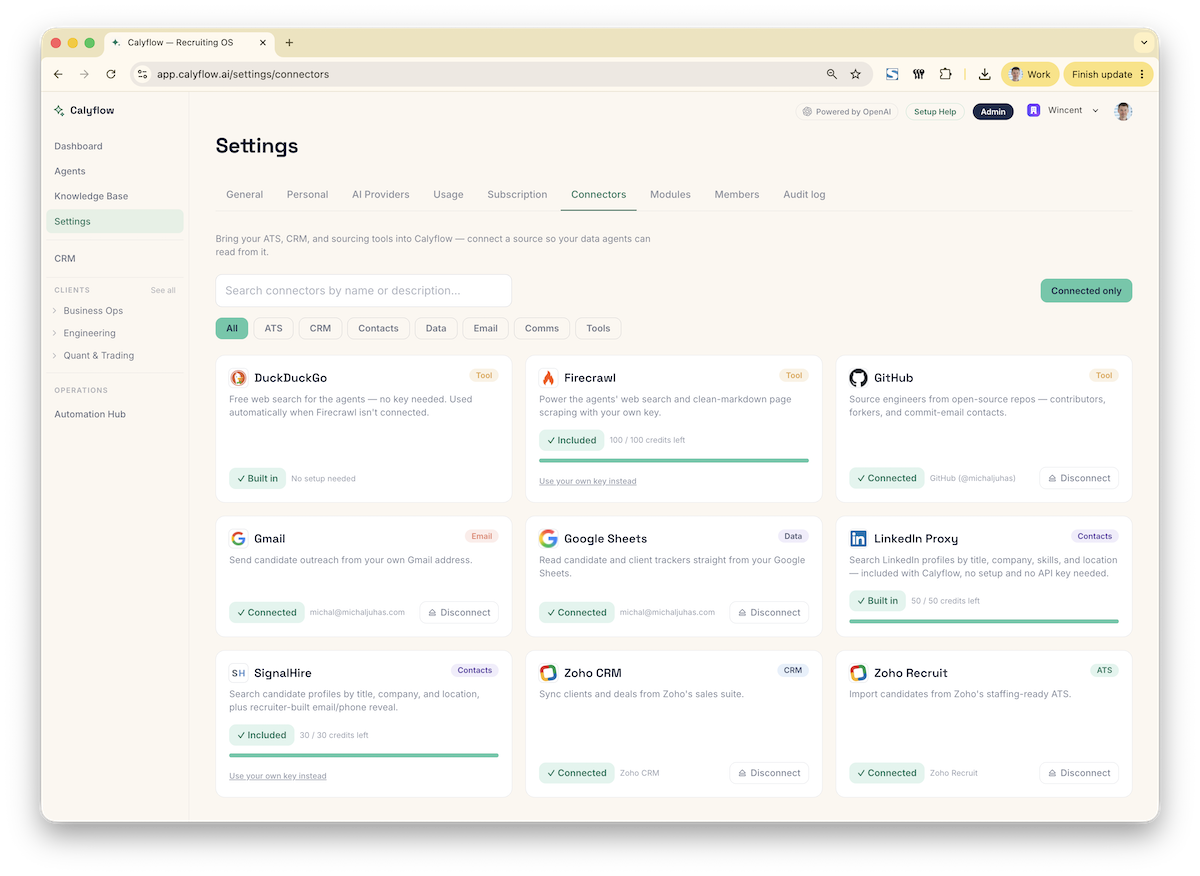
Open Settings → Connectors and you’ll see LinkedIn Proxy already there: a built-in card with a credit meter showing what’s left of your pool. That’s the whole surface. No Connect button, because there’s nothing to connect.
To put it to work, run the sourcing pipeline the way you already do:
- Documents, make sure the project has an active job description and intake notes.
- Sourcing Plan, hit ✨ Generate plan. LinkedIn Proxy shows up as an available channel, so the strategy accounts for it from the start.
- Qualification, generate your scoring criteria.
- Shortlist, set a goal and a budget, press ▸ Start sourcing, and walk away.
That’s a complete, working sourcing pipeline with zero tools connected. Your first role, your first ranked shortlist, on day one.
How it sources autonomously
You never invoke LinkedIn Proxy directly, the sourcing agent does. When you press ▸ Start sourcing, the agent works through your channels in cost order, and LinkedIn Proxy leads that ladder deliberately: it’s already paid for and it’s the broadest people database available to the run, so it’s where the agent starts before touching anything that spends your money.
A typical run looks like this:
- The agent reads your Sourcing Plan and Qualification criteria, then searches LinkedIn Proxy with the titles, companies, skills, and locations that fit the role.
- For promising matches it collects the full profile and scores the candidate 0–100 against your qualification rubric, the same evidence-over-vibes discipline as the rest of the pipeline.
- Everything lands in the Shortlist table, deduped against what’s already there, with the live trace showing every search and every decision as it happens.
- When the run ends, it logs its progress on the Sourcing Plan, so pressing ▸ Continue sourcing tomorrow extends today’s work instead of repeating it.
And when the included pool runs out? Nothing breaks. The agent simply notes it and moves down the ladder to your other connected tools and free channels. Sourcing keeps going; you just stop drawing on the included credits. Need a bigger allowance? Reach out at hello@calyflow.ai.
What this means for a recruiter
Your first shortlist costs nothing to set up. The gap between “created an account” and “reviewing scored candidates” used to be a vendor decision. Now it’s a job description and two button presses.
Try before you buy data tools. Source a real role on the included pool first. When you do decide to connect a paid enrichment or sourcing tool, you’re choosing based on what the included search couldn’t find, not on a sales page.
The whole team shares one pool. Credits are workspace-wide, so nobody is blocked waiting for their own license. The meter in Settings → Connectors always shows where you stand, and LinkedIn Proxy appears alongside your other tools in the Shortlist’s Data-source spend limits, so runs stay inside the budget you set.
It compounds with your feedback. LinkedIn Proxy feeds the same Shortlist loop as every other source: mark candidates ✓ Good fit or ✕ Not a fit, and the next run leans toward the profiles you liked. The included credits don’t just find candidates, they train your pipeline on what “good” means for your desk.
It stacks with everything else. Connect an ATS and the agent checks your own database first. Connect enrichment tools and the shortlist becomes contactable. LinkedIn Proxy isn’t a replacement for your stack: it’s the guaranteed floor under it, so a Calyflow workspace is never a sourcing dead end.
Included, not a trial
One thing LinkedIn Proxy is not: a time-boxed trial that expires and takes your pipeline with it. It’s a built-in part of every workspace. The credit pool is what’s metered: and when it’s spent, your pipeline keeps running on whatever else you’ve connected, with everything you’ve sourced, scored, and learned still in place.
Plan it. Define it. Source it. Now with one less excuse between you and the first run.
New to Calyflow? Create a free account, no credit card, and run your first sourcing pipeline on the included credits.
Related posts
VIDEO: AI Talent Sourcing: Technology Roles
A replay: watch Calyflow’s agents source, qualify, and rank technology candidates from a JD and intake notes, for about a dollar a run.
Stop hunting for email addresses. Let your agents do it.
Connect the enrichment tools you already use, ContactOut, Apollo, Hunter, and more, and let agents turn a shortlist into verified, contactable leads.
Introducing Shortlist: from blank project to scored shortlist
An AI sourcing pipeline, Plan, Qualification, and Shortlist, that takes a project from blank slate to a scored, ranked shortlist on autopilot.
Ready to run this as a workflow?
Calyflow turns this playbook into a repeatable workflow on your own AI, data, and tools.
Create free account