Introducing Shortlist: from blank project to scored shortlist
· 5 min read · Michal Juhas
Sourcing has always been three jobs wearing one hat: figure out where to look, decide what “good” means for this role, then actually go find people and rank them. Do it well and you fill the role. Do it ad hoc, a different mental model on every req, and you waste runs searching the wrong places for the wrong signals.
Today we’re shipping Shortlist: a complete, AI-driven sourcing pipeline that takes a project from a blank slate to a scored, ranked shortlist. It’s three stages, Sourcing Plan, Qualification, and Shortlist, and each one feeds the next.
The pipeline
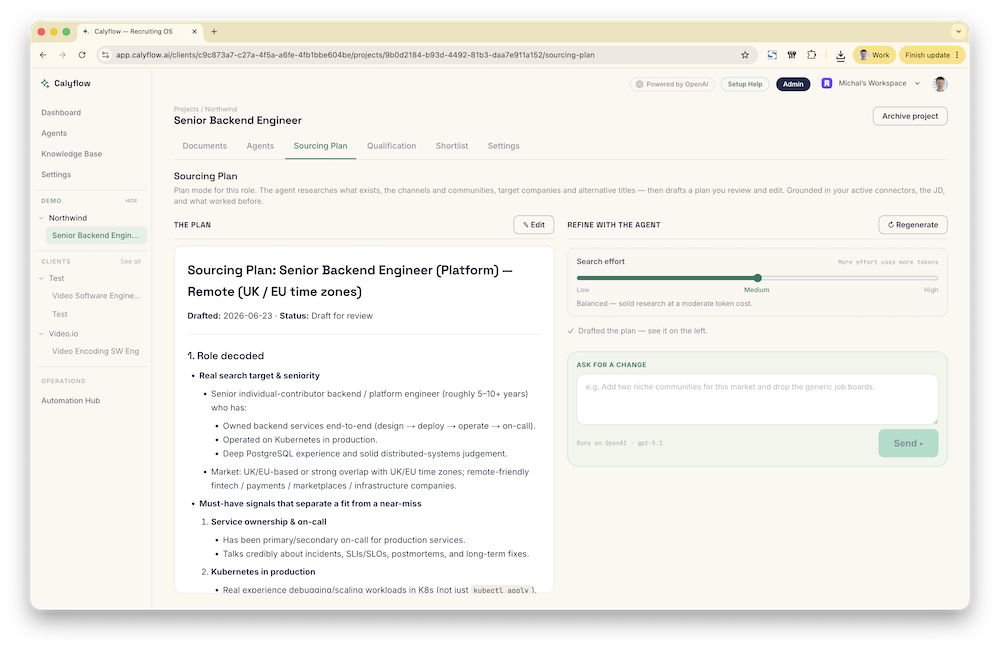
1. Sourcing Plan, where to look
Start on the Sourcing Plan tab and hit ✨ Generate plan. Calyflow reads your job description and intake notes, researches the hiring landscape, searching and reading the web, pulling from your project documents, and drafts a phased strategy: which sources to prioritize, which communities and channels are worth your time, in what order.
It’s a living document. Edit it inline, or ask for changes in plain language in the chat, “add two niche communities for this market, drop the generic job boards”, and the agent revises it. Every revision is kept in a threaded history so you can see how the strategy evolved. (We went deep on this stage in Introducing Sourcing Plan.)
2. Qualification, what “good” means
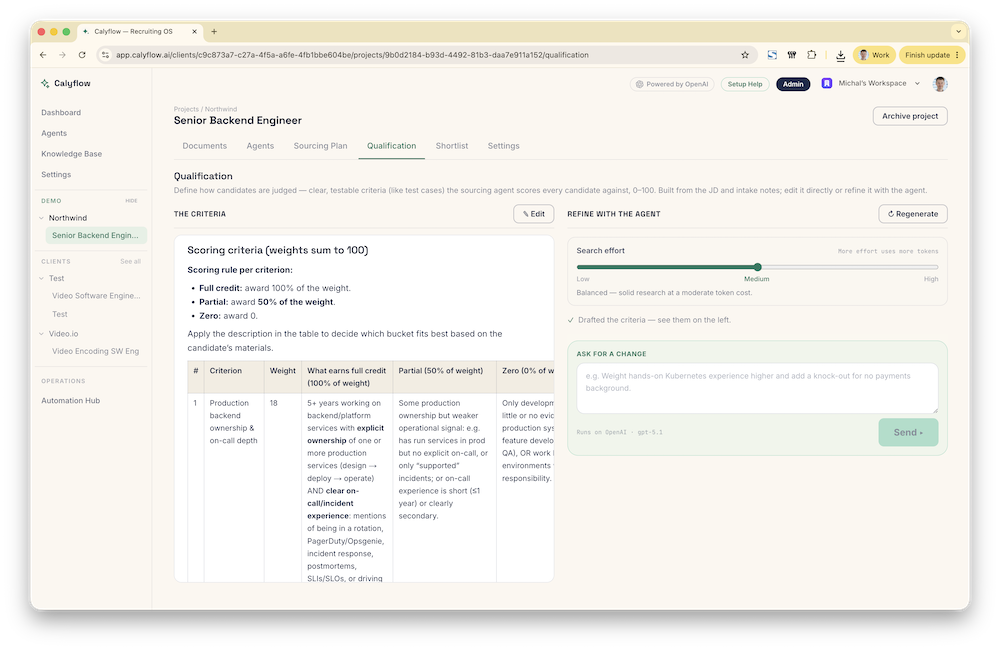
The Qualification tab is where you define how candidates get judged. Click ✨ Generate criteria and Calyflow turns your JD and notes into clear, testable criteria, like test cases, that the sourcing agent scores every candidate against, 0–100. Must-haves, nice-to-haves, and an explicit scoring rubric.
Same editing model as the plan: tweak it directly or refine it by chat, “weight hands-on Kubernetes experience higher and add a knock-out for no payments background.” When you’re happy, this rubric becomes the yardstick for every candidate the agent finds, the same evidence-over-vibes discipline we apply to screening, now driving sourcing too.
3. Shortlist, go find them
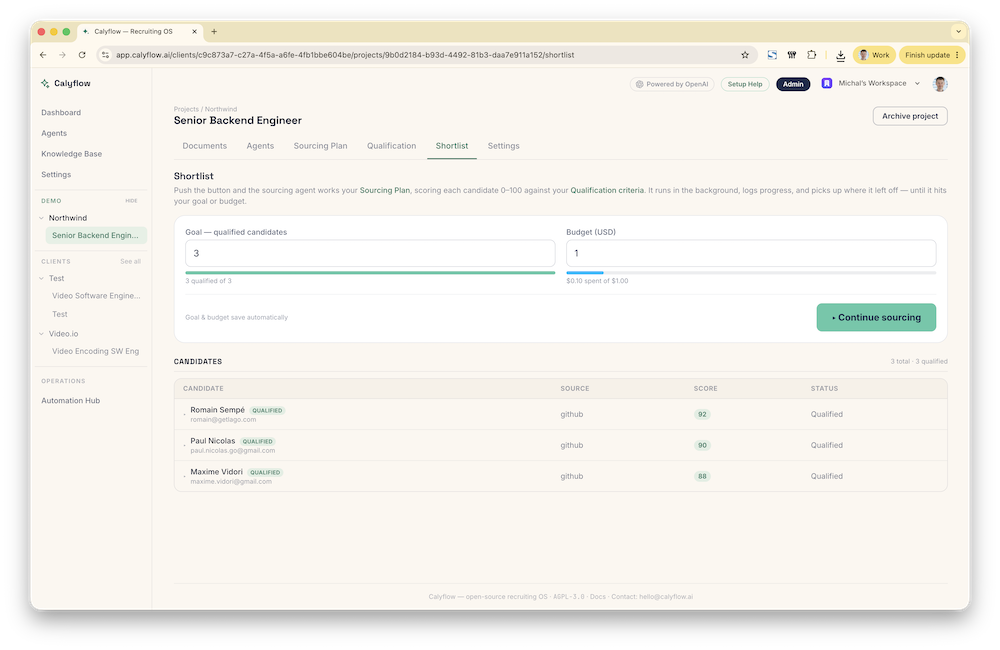
The Shortlist tab is where it all executes. Set two numbers:
- Goal, how many qualified candidates you want.
- Budget (USD), how much you’re willing to spend getting there.
Both auto-save. Then press ▸ Start sourcing.
From there the sourcing agent works your plan, scoring each candidate 0–100 against your qualification criteria. It runs in the background, you can close the tab. It logs its progress, dedupes against what it’s already found, and picks up where it left off when you hit ▸ Continue sourcing. It keeps going until it hits your goal or your budget, whichever comes first.
While it runs, a live trace shows you exactly what the agent is doing, which sources it’s querying, which pages it’s reading, so it’s never a black box.
The shortlist that builds itself
As the agent works, candidates stream into a ranked table, name, source, a colored score chip, and a qualified badge for anyone clearing the bar. Expand a row to see their LinkedIn, the raw source data, and the score.
The best part is what your input does. Next to every candidate are two buttons:
- ✓ Good fit, find more like this
- ✕ Not a fit, avoid this in future runs
Reject someone and you can add a one-line reason. On the next run, that feedback is fed back to the agent, it leans toward the profiles you liked and steers clear of the ones you didn’t. The shortlist gets sharper the more you use it.
Guardrails that matter
This is an agent spending real money to do real work, so the controls are first-class:
- Goal-bound. It stops the moment you have enough qualified candidates, no runaway searches.
- Budget-bound. Spend is tracked across every run against your USD budget, and a new run won’t even start if you’re already over. The progress bar goes red so there are no surprises.
- Resumable. Sourcing is rarely one-and-done. Each run continues from the last, so “Continue sourcing” tomorrow just extends today’s work instead of repeating it.
Under the hood (the short version)
A few things we built to make this work that are worth a mention:
- One shared workspace for the thinking steps. Sourcing Plan and Qualification run on the same two-column “doc + agent chat” interface, generate, edit inline, or revise by conversation. Consistent, and it threads every revision.
- A Firecrawl connector for real web research. Agents can search and scrape the live web for clean, readable content. Bring your own Firecrawl key in Settings, or rely on the platform’s: and if there’s no key at all, agents fall back to free web search automatically.
- No wasted research. If a research loop runs long, a finalize step feeds everything the agent already gathered back to it, without tools, so it writes the document from what it found instead of throwing the work away.
- Your data, deduped and archived. Candidates are deduplicated by email and LinkedIn within a project, and the full raw payload from each source is archived for you.
How to run it
- Documents, make sure the project has an active job description and any intake notes.
- Sourcing Plan, generate and refine your strategy.
- Qualification, generate and tune your scoring criteria.
- Shortlist, set a goal and a budget, press ▸ Start sourcing, and walk away.
Plan it. Define it. Source it. Then review a ranked shortlist that gets better every time you give it feedback.
New to Calyflow? Create a free account, your own API key, no credit card, and run your first sourcing pipeline.
Related posts
VIDEO: AI Talent Sourcing: Technology Roles
A replay: watch Calyflow’s agents source, qualify, and rank technology candidates from a JD and intake notes, for about a dollar a run.
Introducing LinkedIn Proxy: sourcing before you connect anything
Every workspace now includes LinkedIn people search on Calyflow's own credits, no account, no API key, no setup. Your sourcing agent uses it from day one.
Stop hunting for email addresses. Let your agents do it.
Connect the enrichment tools you already use, ContactOut, Apollo, Hunter, and more, and let agents turn a shortlist into verified, contactable leads.
Ready to run this as a workflow?
Calyflow turns this playbook into a repeatable workflow on your own AI, data, and tools.
Create free account