Run your recruiting agents straight from Slack
· 3 min read · Michal Juhas
Calyflow now lives where your team already works. Connect Slack once, point a channel at a project, and your whole team can run AI recruiting agents, sourcing, CV screening, scorecards, outreach, by typing a message. No tab-switching, no logins, no “can you run that for me?” Results land back in the channel for everyone to see, and Calyflow can post a short status report to each project’s channel every morning.
Here’s everything you can do, with examples.
What you get
- Run any agent with a slash command,
/calyflow github-sourcer find 5 Rust engineers - Or just @mention the bot,
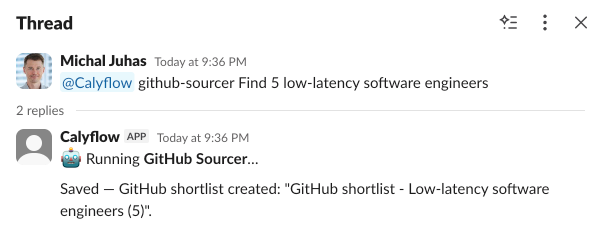
@Calyflow github-sourcer Find 5 low-latency software engineers - Results land back in the thread, the agent replies where you asked, and the output is saved to the project, so the channel doubles as a shared log of what ran and what it produced.
Every agent you already run in Calyflow is available the same way. A few examples across the search:
- Sourcing,
@Calyflow github-sourcer find 5 senior Go engineers in Berlin, or run a Sourcing Map from the job description with/calyflow sourcing-map. - CV screening, drop CVs into a thread and
@Calyflow cv-screener, and you get an evidence-quoted scorecard back, every claim tied to a line in the CV. - Scorecards & questions,
/calyflow scorecard Anna Novakovareturns the fit score, the must-haves table, and tailored screening-call questions. - Outreach,
/calyflow outreach <candidate>drafts the LinkedIn, InMail, and email sequence in your voice, ready to copy out.
Because the command runs the same versioned agent as the app, search #50 from Slack is as thorough as search #1 from the dashboard. The channel is just a faster door into the same workflow.
A status report every morning
Point a Slack channel at a project and Calyflow can post a short morning digest there: what ran overnight, what each agent produced, which shortlists are ready to review, and anything that needs a human. Your team opens Slack and already knows where every search stands, no one has to log in to find out.
This is the Automation Hub reporting into the place your team already checks first.
Why running from Slack matters
The friction that kills AI adoption on a team is rarely the AI, it’s the context switch. A recruiter mid-conversation in Slack isn’t going to stop, open another tab, log in, find the project, and run an agent. So they don’t, or they ping the one colleague who “knows the tool.”
Putting the agents in Slack removes that gap:
- The whole team can run them, not just the person who set Calyflow up. Anyone in the channel can type a command.
- Results are visible to everyone. The output lands in the thread, so the next person sees what was already done instead of re-running it.
- It’s repeatable, not improvised. A slash command runs a defined agent, so you get the workflow’s quality, not the prompter’s mood.
Set it up in two minutes
Connect Slack from your Calyflow workspace settings, authorize the app, and pick which channel maps to which project. From then on, anyone in that channel runs agents by typing, and the morning report shows up on its own. Like every other integration, it runs on your own AI keys and your own data; Calyflow is just the workflow layer in between.
The takeaway
Your recruiting agents now meet your team where they already are. Connect Slack once, and sourcing, screening, scorecards, and outreach are a message away, for everyone, with results in the open and a status report waiting every morning.
Run your first agent from Slack: create a free account and connect your workspace. Your own API key, no credit card.
Related posts
Why every recruiting team needs its own AI intelligence layer
Recruiters have become the manual intelligence layer wiring together disconnected systems, and that knowledge walks out the door. Here is the missing layer.
Introducing Knowledge Base: give AI your team context
Stop getting generic output. The Calyflow Knowledge Base lets your agents work with your proven strategies, client preferences, and role specifics.
Calyflow now connects to Recruitis
Recruitis is now a Calyflow connector, bring your candidates and jobs in, and put AI agents to work sourcing, screening, and outreach on your own data.
Ready to run this as a workflow?
Calyflow turns this playbook into a repeatable workflow on your own AI, data, and tools.
Create free account