Introducing Sourcing Plan: research before you source
· 4 min read · Michal Juhas
Great sourcing doesn’t start with a search box. It starts with a strategy: where the right people actually hang out, which channels are worth your time, and what terms will surface them. Most recruiters carry that map in their head, or worse, rebuild it from scratch on every new role.
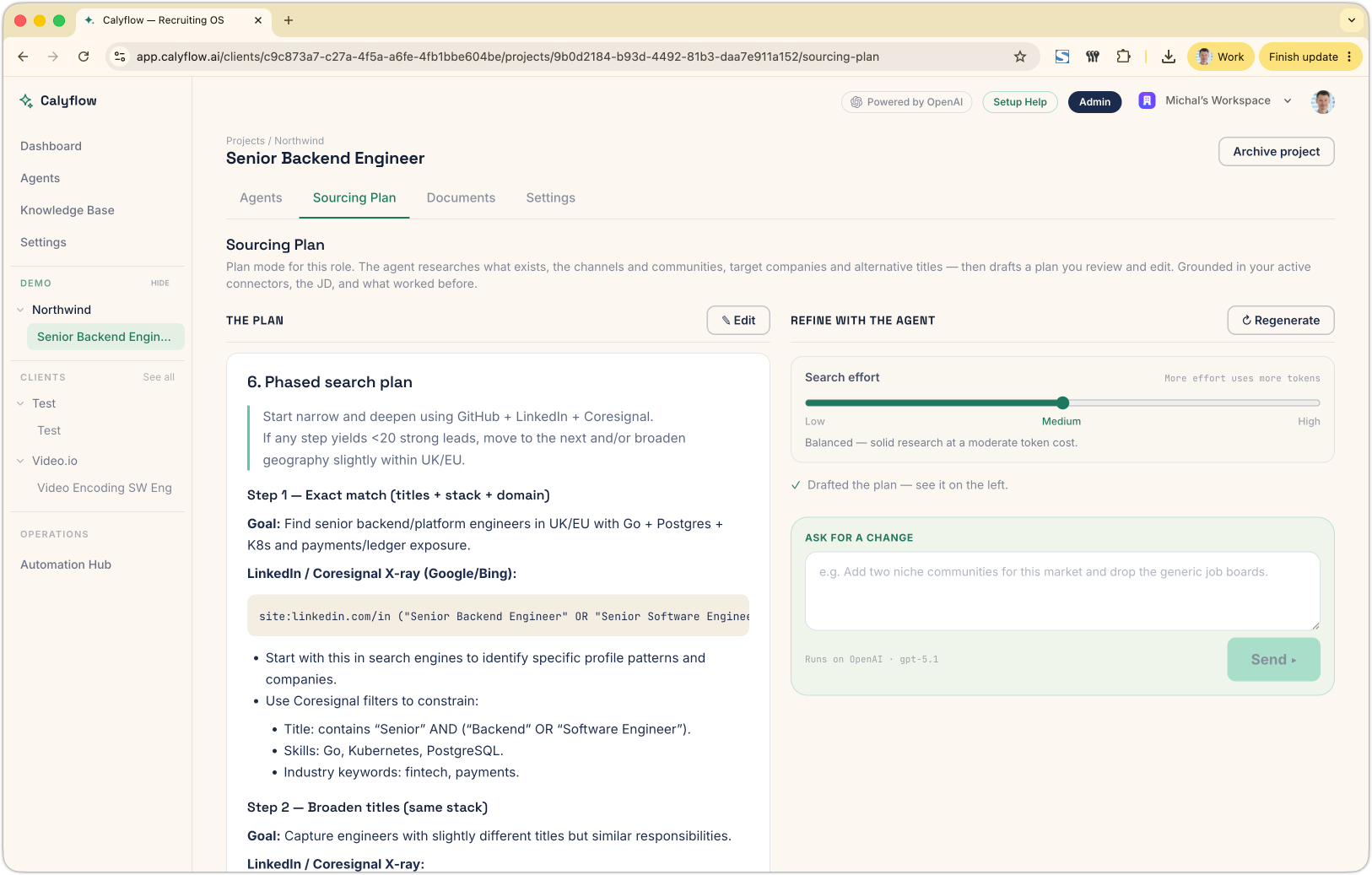
Today we’re shipping Sourcing Plan, a new mode inside every Calyflow project that does that thinking up front. Click ✨ Generate plan and Calyflow researches the landscape for your role, then hands you a phased, editable strategy you can refine before any execution agent lifts a finger.
The problem: everyone runs before they look
Calyflow already has a fleet of execution agents, the GitHub Sourcer, ATS Shortlister, and the rest, that go find and rank candidates for you. They’re fast. But fast without direction means you can burn a run searching the wrong communities with the wrong keywords, then do it again on the next role.
What was missing was the step before execution: a deliberate, research-backed plan of attack. That’s the gap Sourcing Plan fills: and it’s the natural next step up from a one-shot sourcing map.
How it works
Sourcing Plan lives as its own tab in your project, right alongside Agents, Documents, and Settings. The flow is built to keep you in control the whole way:
- Generate. Hit ✨ Generate plan. Calyflow reads your job description and project context, then researches the sourcing landscape, searching the web, reading pages, and pulling from your documents.
- Pick your depth. A simple Low / Medium / High effort slider lets you trade speed for thoroughness. Medium is the default; High does deeper research with more tool calls; Low is fast and cheap.
- Watch it think. The research streams live, ”▸ Searched the web → ✓ Read a web page”, so you can see exactly what’s informing the plan instead of staring at a spinner.
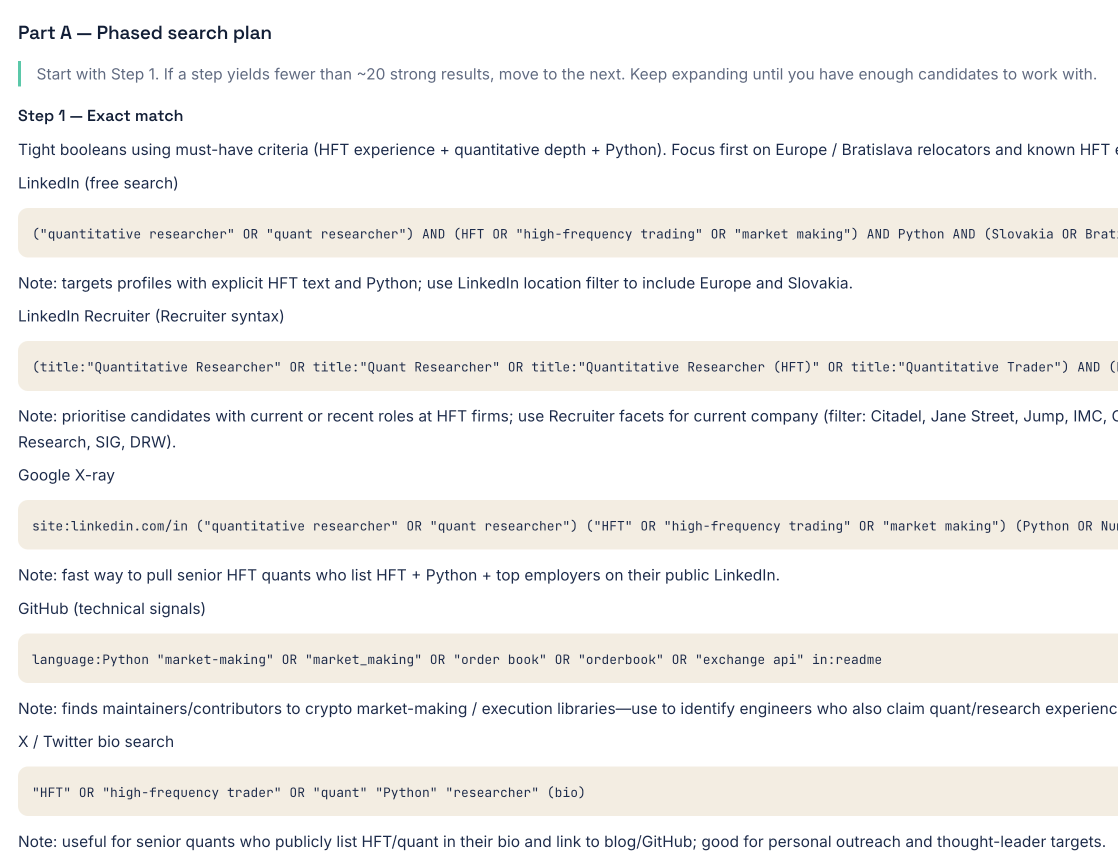
- Review the draft. When it’s done, you get a clean, phased plan in Markdown: where to look, which channels, what search terms, in what order.
- Edit inline. Hit ✎ Edit to tweak the plan directly. It’s your document, change anything.
- Or just ask. Below the plan there’s a chat composer. “Add two niche communities for this market and drop the generic job boards.” Calyflow revises the whole plan with your instruction, and keeps every revision in a threaded conversation so you can trace how the plan evolved.
The part that makes it more than a doc: the progress log
Here’s where Sourcing Plan stops being a static document and starts being the connective tissue of your whole project.
The plan is automatically injected into every sourcing agent’s context. So when the GitHub Sourcer finishes a run, it writes one line back into the plan’s progress log:
Searched GitHub Kafka + CloudNativePG repos → 18 strong candidates → next: email outreach
That log is append-only, earlier entries are never overwritten, and it travels with the plan. The result: the next agent you run already knows what’s been done, so it doesn’t repeat searches or step on work that’s already finished. Your plan becomes a living record of the campaign, not a doc you wrote once and forgot.
Five agents now feed the loop: the GitHub Sourcer plus the ATS, Sheet, Coresignal, and Vincere shortlisters.
A few deliberate choices
- One active plan per project. Like your job description, there’s a single live plan at a time. Earlier versions are archived for history, but agents always work from the current one, no ambiguity about which strategy is in force.
- Research-only, by design. The plan generator gets web search, web scraping, and access to your project documents, and nothing else. No ATS, no email, no candidate data. Planning is pure research; execution stays with the execution agents.
- History you can revisit. Every generate and revise turn is recorded, grouped by conversation, so the thinking behind a plan is never lost.
Who it’s for
If you run sourcing across many roles, at an agency, a staffing firm, or an in-house team juggling reqs, Sourcing Plan gives you a repeatable way to research before you execute, keep a strategy you can edit in plain language, and track what’s actually been done as your agents work.
Try it
Open any project, head to the Sourcing Plan tab, and click ✨ Generate plan. Make sure the project has an active job description first, Calyflow will nudge you if it’s missing.
Plan first. Source second. Repeat without re-thinking.
New to Calyflow? Create a free account, your own API key, no credit card, and plan your first search.
Related posts
VIDEO: AI Talent Sourcing: Technology Roles
A replay: watch Calyflow’s agents source, qualify, and rank technology candidates from a JD and intake notes, for about a dollar a run.
Introducing LinkedIn Proxy: sourcing before you connect anything
Every workspace now includes LinkedIn people search on Calyflow's own credits, no account, no API key, no setup. Your sourcing agent uses it from day one.
Stop hunting for email addresses. Let your agents do it.
Connect the enrichment tools you already use, ContactOut, Apollo, Hunter, and more, and let agents turn a shortlist into verified, contactable leads.
Ready to run this as a workflow?
Calyflow turns this playbook into a repeatable workflow on your own AI, data, and tools.
Create free account